In This Guide
You spent hours crafting a catalog, creative portfolio, pitch deck, or magazine, saved it as a PDF, and sent it to clients. What do they see? A rigid, vertical document where they have to scroll endlessly down a gray screen. Flat PDFs are functional, but they lack excitement and personality.
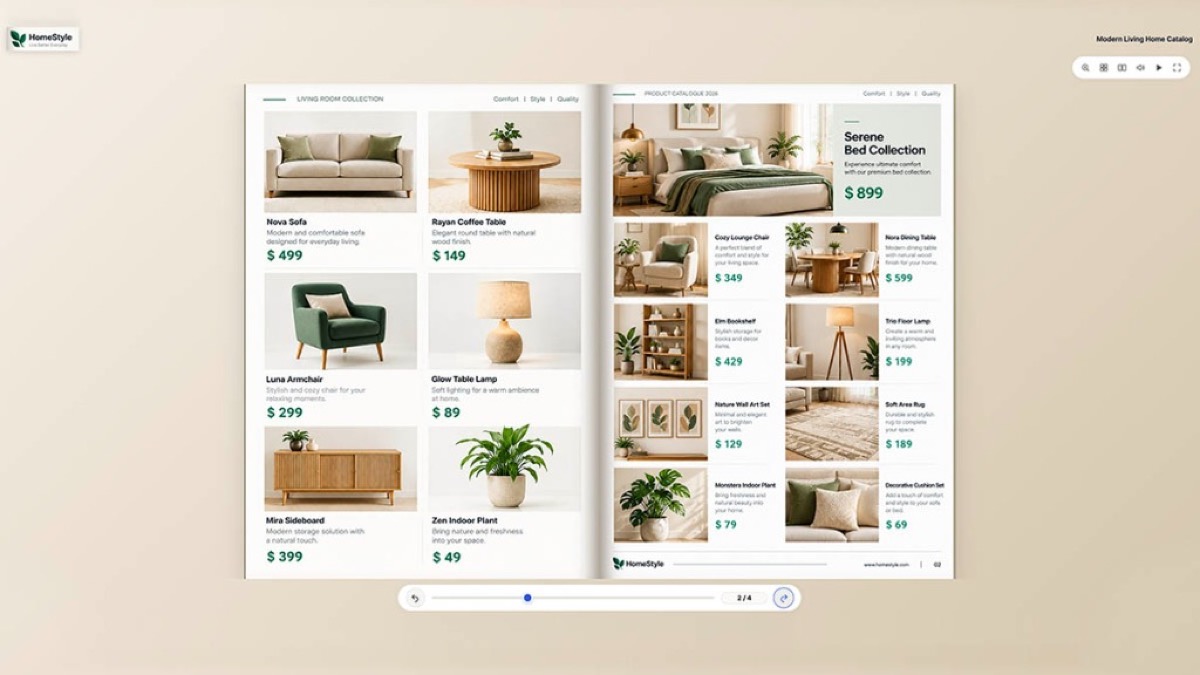
Converting that same document into an interactive 3D flipbook brings it to life. Readers can flip through glossy pages with tactile page curvature, realistic shadows, and crisp page-turn audio. Whether you need to turn a PDF into an interactive flipbook, share an engaging product catalog, or convert business documents into a realistic flippable book, a modern online flipbook maker delivers an unforgettable experience without expensive subscriptions or complicated design software.
Here is the practical, step-by-step guide to converting a PDF to a flipbook for free with zero watermarks, how to customize the reading experience, and why tactile presentation matters more than ever.
Why flat PDFs fail to engage readers
The PDF format was invented in 1993 to ensure documents look identical on every computer printer. That fixed-page layout was revolutionary thirty years ago, but on modern screens, static PDFs have major drawbacks:
- Passive scrolling causes reader fatigue: A 20-page PDF feels like a never-ending wall of paper. Readers skim past important pages just to reach the end.
- Loss of editorial context: Multi-page spreads, two-page magazine layouts, and side-by-side catalog comparisons break down when forced into a single-column vertical scroll.
- Zero tactile engagement: Digital screens naturally crave interaction. When a reader clicks or drags the corner of a page and hears a crisp paper rustle, their attention spikes instantly.
When people search for ways to make a PDF flip like a book, what they are really looking for is physical connection and immersion. A realistic 3D flipbook bridges the gap between digital convenience and physical print. It preserves the familiar joy of browsing through a tangible book while remaining instantly accessible in any web browser.
Convert a PDF to a 3D flipbook in 3 steps
- Open the tool. Head over to the free Spellense PDF to flipbook maker. There is no account creation, login, or email required.
- Add your document. Drop your PDF file into the upload zone, or upload multi-page image sets (JPG, PNG, or WebP). Our PDF book converter immediately renders each page in vector sharpness inside your browser memory.
- Flip and interact. Your 3D book generates on the spot. Click or drag the corners of any page to flip forward or backward, toggle fullscreen mode, or use your keyboard arrow keys to navigate.
Then take one minute to customize your presentation. You can choose from 13 distinct 3D display styles (including Spread, Hardback, and dynamic 3D Carousel), 12 authentic hardcover editions, toggle acoustic page-turn audio, and select your reading mode.
Presentation tip
Press the Fullscreen icon in the flipbook navigation bar during Zoom or Google Meet calls to give your audience an immersive, distraction-free reading experience.
Customize your book: Hardcovers, gloss & flip sounds
Not every document is meant to look the same. A business pitch deck requires a sleek, modern finish, while a photo album looks best with warm bookbinding. Spellense offers 13 interactive 3D display styles and 12 authentic hardcover editions:
13 Display Styles & 12 Book Editions
Choose from 13 interactive modes (Spread, Hardback, Carousel, Fan, etc.) and 12 hardcover editions featuring cloth, antique leather, luxury gold foil, and your own bespoke custom photo cover.
Realistic Page-Turn Audio
Toggle acoustic paper sound effects as pages turn. Readers feel like they are holding physical parchment in their hands.
Mobile Touch & Swipe
Responsive touch gestures let smartphone readers swipe horizontally across the screen to turn pages smoothly on iOS and Android.
High-DPI Vector Clarity
Zoom in without pixelation. Text stays sharp and readable whether viewed on a small phone or an ultra-wide 4K monitor.
5 practical ways people use 3D flipbooks
Who benefits most from a 3D flipbook? Here are five real-world use cases where presentation directly impacts results:
1. Restaurant & Cafe QR Menus
Instead of making diners squint at a tiny, static PDF menu download, placing a 3D flipbook behind a table QR code lets them browse drinks, appetizers, and desserts like a physical menu card.
2. Creative Portfolios & Lookbooks
Graphic designers, fashion creators, and photographers work hard on two-page spreads. A flipbook preserves the intentional pacing and bleed of visual projects without clunky scroll interruptions.
3. Pitch Decks & Client Proposals
Investors and executives review dozens of pitch decks every week. A sleek, interactive book that opens with a hardcover snap makes an immediate, high-end impression before they even read page one.
4. School, College & Community Magazines
Yearbooks, alumni newsletters, and student literary magazines are built for tactile reading. Flipbooks give readers the nostalgia of turning pages without expensive print runs.
5. Product Catalogs & Real Estate Brochures
Shoppers love casually leafing through catalogs. An interactive brochure allows potential property buyers or retail customers to browse high-resolution images naturally.
How Spellense solves the hidden traps of other flipbook makers
If you have ever tried other online flipbook tools, you have likely encountered frustrating roadblocks. Here is how Spellense was built differently:
| Feature | Spellense 3D Flipbook | Typical Online Tools |
|---|---|---|
| Watermarks | Zero watermarks, ever | Giant brand logo plastered on cover |
| Sign-up required | No account or email needed | Forces email and account creation |
| Privacy & Data Security | 100% In-Browser RAM processing | Uploaded & stored on external cloud servers |
| Price | 100% Free | $19 to $79 / month recurring subscriptions |
Pro tips for the cleanest page-turn experience
To get the most professional, high-end presentation from your 3D flipbook, keep these three practical tips in mind before converting:
1. Keep Page Dimensions Uniform
A book looks best when all interior pages share the same aspect ratio (such as standard A4 portrait or US Letter). Mixing landscape and portrait pages in one PDF causes uneven scaling and awkward page-turn transitions.
2. Make Your Cover Stand Out
The very first page of your PDF becomes the front cover of your 3D book. Use a bold title, high-contrast imagery, and clean margins so it commands immediate attention the moment a reader opens the link.
3. Double-Check Text Before Converting
Once your flipbook is live, typos and formatting slips stand out on high-resolution displays. You can run your document through the free Spellense OCR spell checker before generating your book.
Spellense is just getting started (What's coming next)
We want to be completely open with our community: Spellense is currently in its active launch and growth phase. We started this project because we were tired of online document tools charging steep subscriptions for basic tasks or plastering ugly watermarks over people's hard work.
Our 3D Flipbook engine is expanding rapidly, and our engineering team is actively rolling out brand-new capabilities:
- Embeddable iFrames: One-click HTML embed codes so you can embed interactive 3D books directly onto your WordPress, Shopify, or Webflow websites.
- Hyperlink Support: Clickable web links, email buttons, and video popups embedded directly on flipbook pages.
- Custom Branding Options: Add your own business logo, custom background colors, and unique URL links for client presentations.
- Expanded Physical Textures: New paper sound profiles (parchment, newsprint, thick cardstock) and embossed metallic cover textures.
Because we are young and growing, your feedback shapes what we build next. If there is a specific feature, layout style, or tool you need for your business or school, please let us know! Use the Share Your Feedback button on our homepage or drop a line directly to hello@spellense.com. We read and respond to every note.
Frequently asked questions
Is Spellense 3D Flipbook really 100% free with no watermarks?
Yes. We never place watermarks, advertisements, or promotional badges on your books. You can convert and display your work cleanly without paying a penny.
Can I convert images (PNG, JPG) into a flipbook or only PDFs?
Both! You can upload a multi-page PDF or select multiple image files at once (JPG, PNG, WebP). The tool automatically arranges them in order into a unified 3D flipbook.
Does the 3D flipbook work smoothly on mobile phones?
Yes. The engine is fully mobile-responsive. On smartphones and tablets, readers can swipe their fingers across the screen to turn pages smoothly with touch gestures.
How do I make a PDF flip like a real book?
To make a PDF flip like a physical book, simply drop your PDF into the Spellense 3D Flipbook maker. The tool instantly converts flat vertical pages into an interactive, flippable book with realistic page curvature, dynamic shadows, and acoustic page-turn sound effects.
Can I convert a PDF into a digital booklet format?
Yes. If your document was designed with two-page spreads (such as a magazine, annual report, or folded brochure), the flipbook engine automatically displays facing pages together in a unified booklet layout on desktop and tablet displays.
Are my confidential documents uploaded to any server?
No. Spellense processes your files 100% locally in your browser RAM using WebAssembly and HTML5 Canvas. Your financial proposals, personal photos, and documents are never transmitted to or stored on an external server.
Try it now
Ready to transform your flat PDF into an interactive 3D book that clients and readers will actually enjoy browsing? Open the free online flipbook maker, upload your document, choose your cover style, and share your creation.
Turn Your PDF into an Interactive 3D Book Right Now
Upload your PDF or image pages to Spellense. Enjoy tactile page flips, 13 3D display styles, 12 book editions, and zero watermarks with 100% client-side privacy.